Colleqo
EN
Book a demo

Phone directory and org chart for Microsoft Teams

Your company’s phone directory, right inside Microsoft Teams

Colleqo shows the phone list and org chart from Microsoft Entra ID. Call, chat or send an email with a single click.

The real app with made-up data of the fictional Musterfirma GmbH. Try searching for , or .
Live from Entra IDWhen IT updates an entry, Colleqo is up to date.
Read-only accessColleqo changes nothing in Entra ID.
No server on our sideColleqo runs in your Microsoft 365 tenant.
About 30 minutesis all the installation takes.

The phone list in Excel is never up to date

Someone has to maintain it by hand, even though the data has long been in Microsoft 365. Teams shows individual contact cards, but no list by department. New colleagues don’t know who is responsible for what, and the org chart is a slide from two years ago.

Colleqo reads the user accounts your IT already maintains. There is no second list anymore.

What Colleqo does

Phone list by department or from A to Z

All employees grouped by department, with job title, extension, landline, mobile number, email, location and presence status from Teams. If you prefer to look people up by last name, switch to the A–Z view. Filter by department and location, and copy any number with one click.

Mark favourites with the star. They appear at the top of the list and are stored only in your browser.

Colleqo follows the Teams theme: light, dark or high contrast.

Colleqo in Microsoft Teams: phone list with favourites and shared numbers, columns for name, extension, email, landline, mobile, location and contact.

One search for names, departments and numbers

“moeller” finds “Möller”, and the same works for Scandinavian and Polish special characters. Type part of an extension to see whose it is. Spaces and spelling variants don’t matter.

In the org chart, search jumps straight to the person.

Searching for “moeller” finds Marie Möller and Ute Möller, among others.

Reception, hotlines and rooms included

Not every important number belongs to a person. Admins maintain shared numbers such as reception, IT hotline, security or meeting rooms directly in Colleqo, with extension, email, location and a note, for example on opening hours.

They appear at the top of the list or in their department, and show up in search, contact card and export. This way Colleqo also replaces the part of the Excel list that doesn’t come from Entra ID.

Settings page, “Shared numbers and rooms” section: entries for reception, IT hotline, security and a meeting room with extension and note.

Call, chat, email

Colleqo starts Teams calls to people and, with Teams Phone, also calls to landline and mobile numbers. In Teams mobile and outside Teams, the device’s phone app can dial instead.

Country rules bring inconsistently maintained numbers into international format. Only unambiguous numbers are dialled, and the call menu always shows the number that will be dialled.

The contact card shows all contact details, manager and direct reports. On the desktop, you can transfer a contact to your smartphone as a contact file or via QR code. Both are created in the browser.

Contact card of Dr. Katrin Albrecht with call, chat, extension, save contact, QR code and direct reports.

In Teams, on the go and on the intranet

Colleqo runs in Teams on the desktop, in the browser and in Teams for iOS and Android, with its own layout and large touch targets there. In a channel, it is available as a tab.

As a SharePoint web part, Colleqo fits on any intranet page, such as a “Contacts” page.

The interface is available in nine languages. Everyone sees Colleqo in their Teams language.

  • Deutsch
  • English
  • Български
  • Dansk
  • Français
  • Italiano
  • Norsk
  • Polski
  • Español
Colleqo as a web part on a SharePoint “Contacts” page.
Colleqo in Teams mobile: phone list with the bar at the bottom.

For IT

  • Settings page in Colleqo behind the gear icon, on the desktop: hide and unhide people by name search, choose exclusion groups and name patterns such as svc-*, with a preview of who is hidden. Plus country code, call route, cache and refresh interval for the whole tenant. No PowerShell, no new package.
  • Colleqo admins: IT designates people or groups, such as HR or reception, who maintain these settings. They don’t need admin rights in SharePoint or Entra ID. Every change is recorded with name and date in the version history and can be restored.
  • Shared numbers for reception, hotlines and rooms, up to 200 entries. The extension comes from the landline number or from an attribute in Entra ID.
  • Data quality: who is missing a phone number, department, job title, manager or location, and whose number cannot be dialled? With a link to the Entra admin center and export to Excel. Colleqo changes nothing in the process.
  • New in the company, optional and off by default: people who have just started get a “New” badge. Because the hire date is otherwise not visible in Outlook and Teams, we recommend agreeing on switching it on with your data protection officer and works council first.
  • Disabled accounts and guests are not shown anyway.
  • Clear messages in the app when permissions are missing or Microsoft Graph is busy.
  • Updates by replacing the package in the app catalog. Employees don’t have to do anything.
Data quality section on the settings page: 100 of 106 people complete, tiles for missing phone number, department and manager, with an “Open in Entra” link.

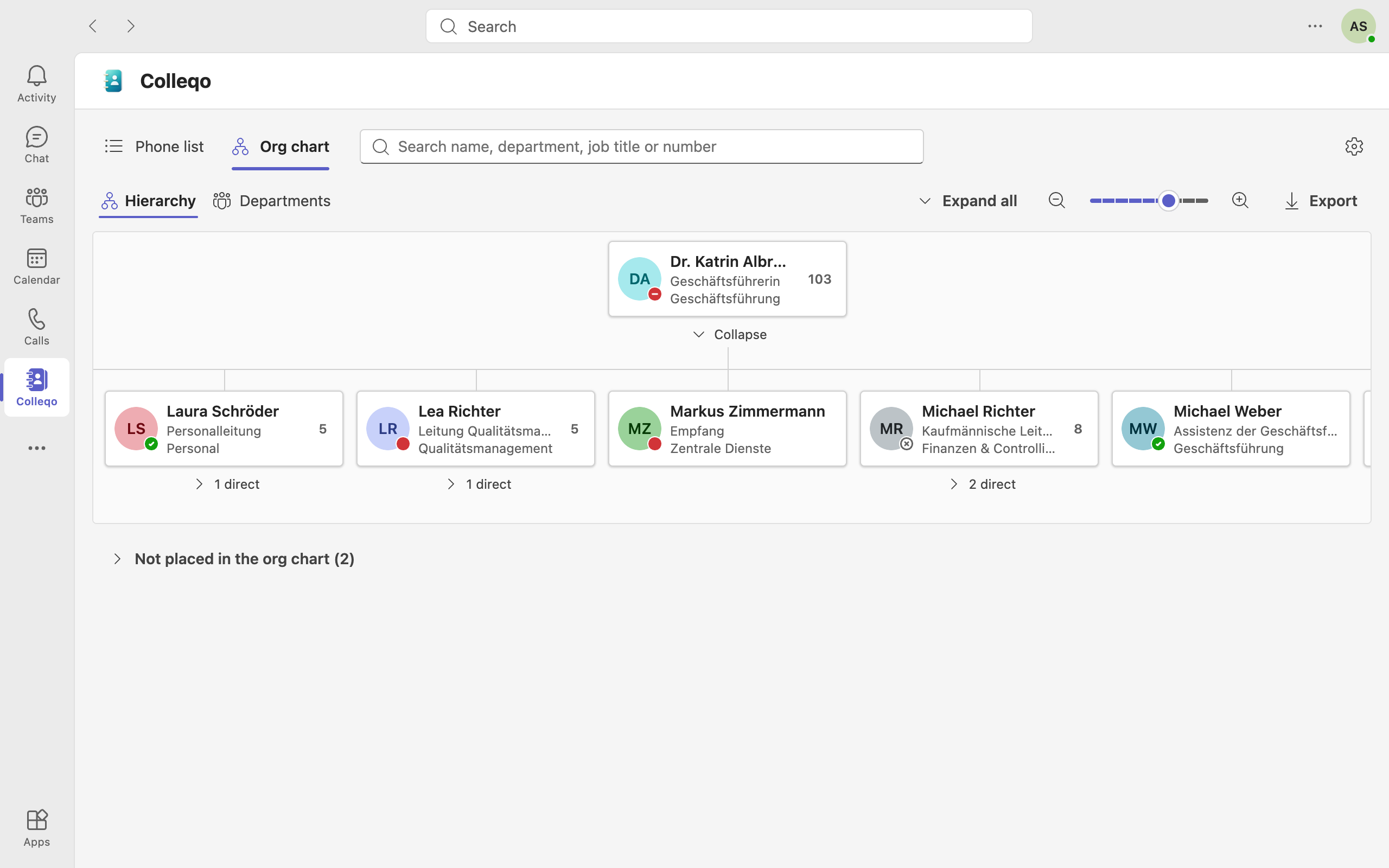
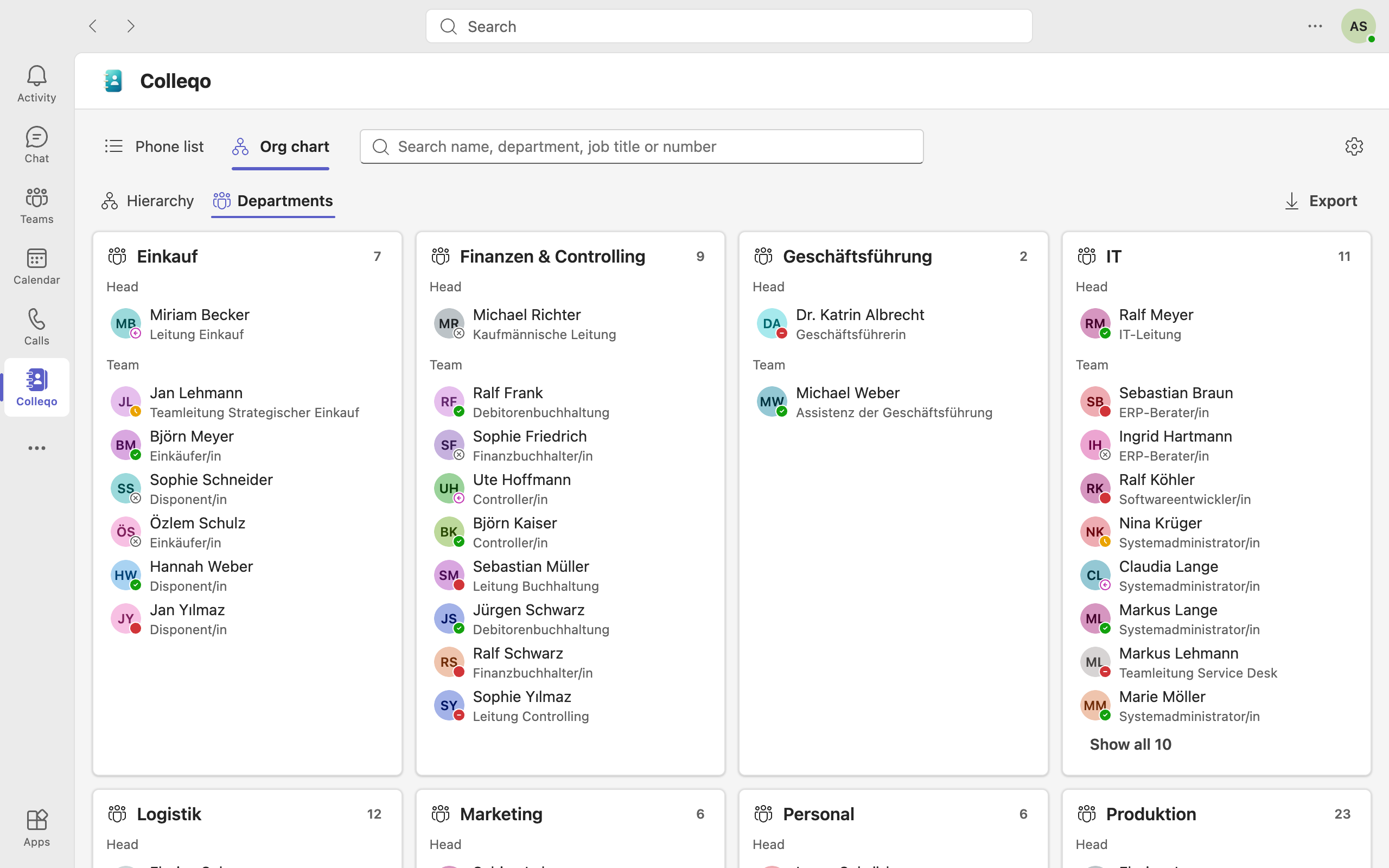
The org chart is built from Entra ID

It is based on the “Manager” field. The hierarchy can be expanded, collapsed and zoomed, and each manager shows the number of employees. The department view shows every department with its head and team. People without an assignment are listed separately, so gaps in the data stand out.

A click selects a person; the round contact button opens the contact card. Colleqo exports the whole company or the part below the selected person as a PDF booklet, with profile pictures and one page per manager. When exporting from a person, their manager is shown at the top for orientation.

Org chart as a people hierarchy with expandable and collapsible levels.

Colleqo runs in your Microsoft 365 and your data stays there

  • Runs in your Microsoft 365

    Colleqo is uploaded as an app package to your SharePoint app catalog and runs in the browser or in Teams. There is no server and no cloud service from innogrators.

  • Data stays in your tenant

    Colleqo only talks to SharePoint Online and Microsoft Graph in your own tenant. The data does not leave your Microsoft 365 tenant.

  • Reads directory data only

    Colleqo uses only delegated read permissions for Microsoft Graph. Everyone sees only what they can already see in Outlook or Teams. The only thing written is Colleqo’s own settings in SharePoint, by admins and with their rights.

  • No app registration, no secrets

    SharePoint handles sign-in. There are no passwords or keys to manage or rotate.

Permissions, data storage, roles for the settings and safeguards, for IT security and data protection.

All security details

How Colleqo gets into your company

  1. 1

    Install

    IT uploads the Colleqo package to the SharePoint app catalog and grants the read permissions.

  2. 2

    Deploy

    Hand it over to Teams with one click and pin it in the left bar for all employees.

  3. 3

    Get started

    Everyone sees the phone list and org chart right away, including in Teams mobile.

The work takes about 30 minutes. Because of Microsoft’s policies, it can take a few hours until Teams has pinned the app for everyone.

We are happy to handle the rollout for you: a data check up front, installation and configuration in your tenant, deployment in Teams, a SharePoint “Contacts” page if you like, and a short guide for the handover.

Discuss the rollout

Try Colleqo in full screen

The live demo is the real app with made-up data of the fictional Musterfirma GmbH. Calls, chats and emails are only simulated.

  • Desktop and smartphone
  • Teams and SharePoint
  • Light, dark, contrast
  • Nine languages
  • Role for the settings
Open demo in a new tab

Frequently asked questions

Do we need a server or a cloud service?

No. Colleqo is an app package for your SharePoint app catalog and runs entirely in your Microsoft 365.

Where is our data?

Where it already is: in Microsoft Entra ID in your tenant. Colleqo reads it live; the data does not leave your tenant.

Where does the data come from, do we have to maintain anything?

From Microsoft Entra ID, that is, from the user accounts your IT already maintains. When something changes there, Colleqo is up to date. There is no second list.

Our data in Entra ID has gaps. Will it still work?

Yes, Colleqo shows what is there. People without a department or manager are shown separately, so gaps stand out quickly. The “Data quality” report on the settings page lists who is missing information. If you like, we run a data check up front.

Can Colleqo change data?

Not in Entra ID, where Colleqo has read access only. The only thing written is Colleqo’s own settings in SharePoint, when an admin saves them on the settings page.

Does everyone see everything?

Everyone sees only what they can already see in Outlook or Teams. Disabled accounts and guests are not shown. Service accounts or individual people can be hidden with an exclusion list. This only affects what Colleqo displays; they remain findable via Outlook and Teams search.

Does IT have to make every change to the exclusion list itself?

No. IT can designate people or groups, such as HR, as Colleqo admins. They maintain the settings directly in Colleqo, without admin rights in SharePoint or Entra ID.

Does Colleqo work on smartphones?

Yes, in the Teams app for iOS and Android, with its own layout. Calls go either through Teams or the phone app.

Do we need Teams Phone?

Only if phone numbers should be dialled through Teams. Person-to-person Teams calls and chats always work. Without Teams Phone, Colleqo dials via the phone app or the default telephony app.

Can we include reception, hotlines and meeting rooms?

Yes. Admins and Colleqo admins maintain shared numbers directly in Colleqo, up to 200 entries. They appear in the list, search, export and contact card.

Does Colleqo show birthdays or anniversaries?

No, deliberately not. Optionally, Colleqo can highlight colleagues who joined in the last few weeks, based on hire date or account creation. The feature is off by default; admins switch it on on the settings page. Because the hire date is otherwise not visible in Outlook and Teams, we recommend agreeing on this with your data protection officer and works council first.

Can I transfer a contact to my phone?

Yes, on the desktop as a contact file (vCard) or via a QR code to scan. Both are created in the browser; no data goes to third parties.

Can we use Colleqo on the intranet too?

Yes, as a web part on any SharePoint page, for example a “Contacts” page.

How do updates work?

We provide a new package, and your IT replaces it in the app catalog. Nothing changes for employees.

What does Colleqo cost?

A one-time setup and an annual license based on company size, with no per-user costs. Get in touch.

Let’s talk about your phone list

We show you Colleqo with demo data, answer the questions from IT and data protection, and send you a quote. There are no per-user costs.

innogrators’ appointment booking opens in a new tab on Microsoft Bookings. You only enter data there. The booking page is in German.

Colleqo is made by innogrators, a Microsoft 365 consultancy for mid-sized companies based in Augsburg, Germany. We develop Colleqo and can roll it out for you.

innogrators.com

Or write to us

Your request goes directly to innogrators. How we process it is described in the privacy policy (German).